Abstract
I've recently been working on some Rust code that I'd like to be rather efficient. Along the path of optimizing, I've come across some tools that make things much easier.
But First, Some General Optimization Advice
It's natural to want to make your whole program faster, but that's actually a waste. Some parts of your program will only be called once when the program starts up. Other parts of your program will be called millions of times. The trick to optimization is to find the 10% of your program where 90% of your running time is actually being spent, and focus on making that more efficient.
Software gets really complicated, and the hardware it's running on is complicated too. Most of our intuition as programmers on where a program should be spending most of its time is actually going to be wrong. To do optimization well, you need tools to make the performance of your program visible. Here are some tools that are in my tool belt while I'm working with Rust.
Criterion
Criterion is a Rust library for writing benchmarks. It's like a test framework, except it will call your 'test' in a loop and generate a fancy report telling you how long your code takes to run.
It will tell you how fast your code ran, how that compares to the previous run (in case you made changes), and it will generate a great HTML report.
One of the really nice features I've used in Criterion is its
"benchmarking with a range of values". I had a function that I
suspected was running in O(n^2) time (if you haven't encountered Big O
notation, that means that if the input is twice as big, the running
time will be four times slower). I gave the function a range of
different size inputs, and it was able to show me a chart of its
performance. The great part is that, after doing the optimization, the
same benchmark could show that I improved algorithm to run in O(n)
time (if the input is twice as big, the running time is two times
slower).
Like a test runner, Criterion lets you run specific benchmark or group of benchmarks, which is particularly useful because benchmarks can take a while to run.
PProf
PProf is a profiler that's built to be easily integrated into Rust programs. The thing that makes it magical is how well it works together with Criterion. If you tell Criterion to use PProf as a profiler, it gives your Criterion benchmarks the ability to produce flame graphs!
PProf's Criterion example was particularly useful for adding PProf to
my Criterion benchmarks. Something that wasn't obvious to me is that
Criterion will only run the profiler if you pass the --profile-time
command line argument. To create a flame graph for a specific
benchmark, run cargo bench --bench my-benchmark-suite --
--profile-time 60 my-benchmark
Heaptrack
I've been looking for a while for a way to figure out how much memory my Rust programs are using. I'm happy to have recently discovered Heaptrack.
Unfortunately Heaptrack isn't nicely integrated into Rust libraries, but rather it's a separate command line program. It's also unfortunately Linux only, but that's currently good enough for me.
If these two aren't a deal breaker, you can run heaptrack
target/release/my-binary, and then after your binary finishes running
it will generate a report on the heap memory allocations of your
program and how much heap memory it ended up using.
A Quick Worked Example
It's all well and good to talk about the tools, but it's much easier to show how to use them with a worked example. In this example, I'm going to be profiling two different sorting algorithms: Bubble Sort and Merge Sort.
The Thing We're Analyzing
There are my function implementations.
/// Bubble sort compares adjacent elements and swaps them if they're
/// the wrong way around. Repeat until everything's sorted.
pub fn bubble_sort(data: &mut [u32]) {
    if data.len() <= 1 {
        return;
    }
    loop {
        let mut sorted = true;
        for i in 0..data.len()-1 {
            if data[i] > data[i+1] {
                data.swap(i, i+1);
                sorted = false;
            }
        }
        if sorted {
            break;
        }
    }
}

/// Merge sort divides the array into two halves, sorts the halves
/// independently, then merges the results.
pub fn merge_sort(data: &mut [u32]) {
    if data.len() <= 1 {
        return;
    }

    let middle = data.len() / 2;
    let mut left = data[middle..].to_vec();
    let mut right = data[..middle].to_vec();
    merge_sort(&mut left);
    merge_sort(&mut right);

    let mut ileft = 0;
    let mut iright = 0;
    while ileft + iright < data.len() {
        let left_done = ileft >= left.len();
        let right_done = iright >= right.len();
        if !left_done && (right_done || left[ileft] < right[iright]) {
            data[ileft + iright] = left[ileft];
            ileft += 1;
        } else {
            data[ileft + iright] = right[iright];
            iright += 1;
        }
    }
}

#[cfg(test)]
mod test {
    use super::*;

    #[test]
    fn bubble_sort_sorts() {
        let mut data = vec![2, 4, 3, 5, 1];
        bubble_sort(&mut data);
        assert_eq!(data, vec![1, 2, 3, 4, 5]);
    }

    #[test]
    fn merge_sort_sorts() {
        let mut data = vec![5, 1, 3, 2, 4];
        merge_sort(&mut data);
        assert_eq!(data, vec![1, 2, 3, 4, 5]);
    }
}
We want to use
Criterion to see how fast these are for a variety of inputs.
Use PProf to identify hotspots.
Use Heaptrack to see which uses more memory.
Benchmarking with Criterion
We'll start with our Cargo.toml, which defines our dependencies and
tells Cargo what to run when we say cargo bench.
[package]
name = "rust-perf-tools-demo"
version = "0.1.0"
authors = ["Justin Wernick <justin@worthe-it.co.za>"]
edition = "2018"

[dev-dependencies]
criterion = "0.3"
pprof = { version = "0.4.2", features = ["flamegraph", "criterion"] }
# We use rand in our benchmarks to create random data to sort
rand = "0.8.0"

[[bench]]
name = "bench_sort"
harness = false

[profile.release]
# This is useful when profiling, because lets the tools include your
# function names in the profiling reports.
debug = true
We've told cargo our benchmark is called bench_sort, so it will
expect to find it in ./benches/bench_sort.rs.
use criterion::{
    Criterion,
    Throughput,
    BenchmarkId,
    criterion_group,
    criterion_main
};
use rust_perf_tools_demo::{bubble_sort, merge_sort};
use pprof::criterion::{PProfProfiler, Output};
use rand::prelude::*;

criterion_main!(benches);

criterion_group!{
    name = benches;
    config = Criterion::default()
        .with_profiler(
            PProfProfiler::new(100, Output::Flamegraph(None))
        );
    targets = bench_bubble_sort, bench_merge_sort
}

fn bench_bubble_sort(c: &mut Criterion) {
    let mut group = c.benchmark_group("bubble_sort");
    // We want to see how our sorting algorithms perform on different
    // sized inputs, so we call group.bench_with_input in a
    // loop. These are 11 different benchmarks, with names like
    // bubble_sort/1000 and bubble_sort/2000. Criterion will know to
    // show these benchmarks together on the report because they're
    // all in the same group.
    for length in (0..=10_000).step_by(1_000) {
        group.throughput(Throughput::Elements(length as u64));
        group.bench_with_input(
            BenchmarkId::from_parameter(length),
            &length,
            |b, &length| {
                let mut input: Vec<u32> = (0..length).collect();
                let mut rng = thread_rng();
                b.iter(|| {
                    input.shuffle(&mut rng);
                    bubble_sort(&mut input);
                });
            }
        );
    }
    group.finish();
}

fn bench_merge_sort(c: &mut Criterion) {
    let mut group = c.benchmark_group("merge_sort");
    for length in (0..=10_000).step_by(1_000) {

        group.throughput(Throughput::Elements(length as u64));
        group.bench_with_input(
            BenchmarkId::from_parameter(length),
            &length,
            |b, &length| {
                let mut input: Vec<u32> = (0..length).collect();
                let mut rng = thread_rng();
                b.iter(|| {
                    input.shuffle(&mut rng);
                    merge_sort(&mut input);
                });
            }
        );
    }
    group.finish();
}
We can then either run ALL THE BENCHMARKS, or be targeted in which we want to run.
# This will run ALL benchmark suites
cargo bench

# This will run a specific benchmark suite
cargo bench --bench bench_sort

# This will run only bubble sort benchmarks
cargo bench --bench bench_sort -- bubble_sort

# This will run a specific bubble sort benchmark
cargo bench --bench bench_sort -- bubble_sort/10000
Criterion will put its output in target/criterion. Opening
target/criterion/report/index.html in a web browser is a good place
to start.
firefox target/criterion/report/index.html
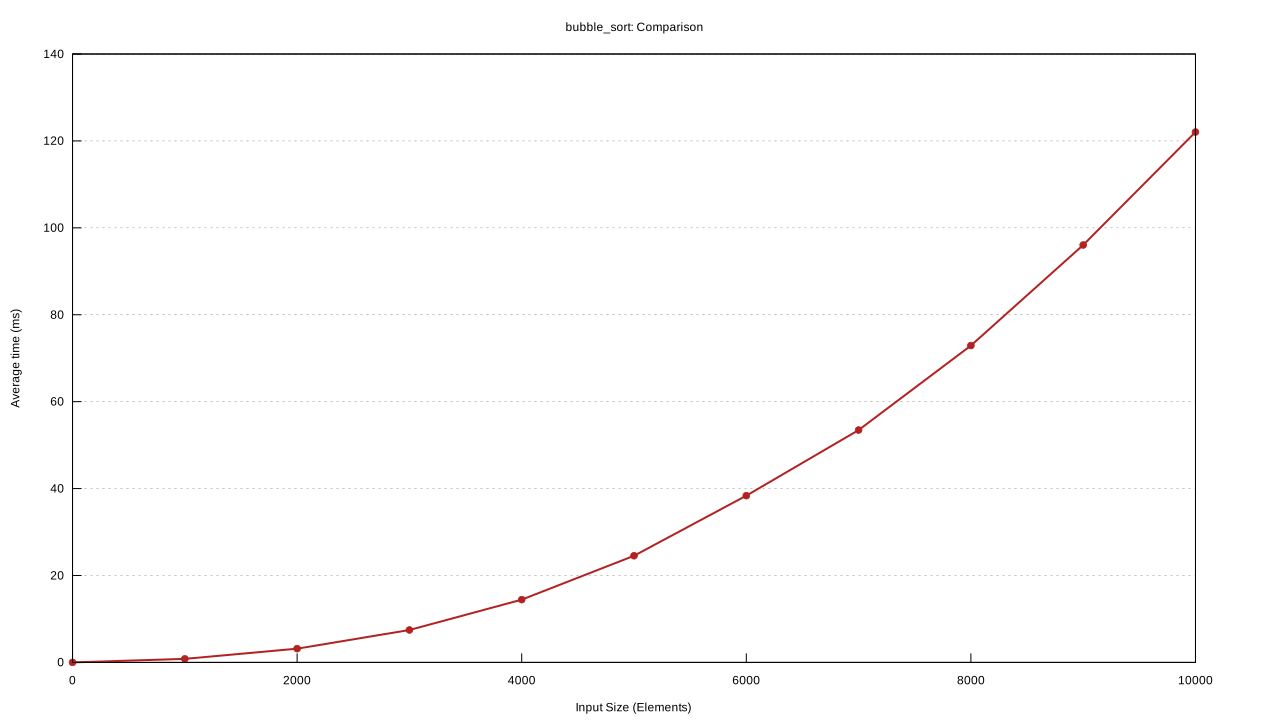
The report has lots of details, but in this case one of my favourites is the graph of the average time taken against the input size. Unfortunately, the labels on the graph are sized assuming you're going to be looking at them fullscreen on a large monitor, not scaled down into a blog article, so the labels are tiny.
This is the graph for bubble sort. The y axis is average time, and the x axis is input size. At 10000 elements, the time it takes is 120 milliseconds.
And this is the graph for merge sort. The axes are the same as the bubble sort graph, but the scale of the y axis is dramatically different. At 10000 elements, the time it takes is 1000 microseconds (or 1 millisecond).
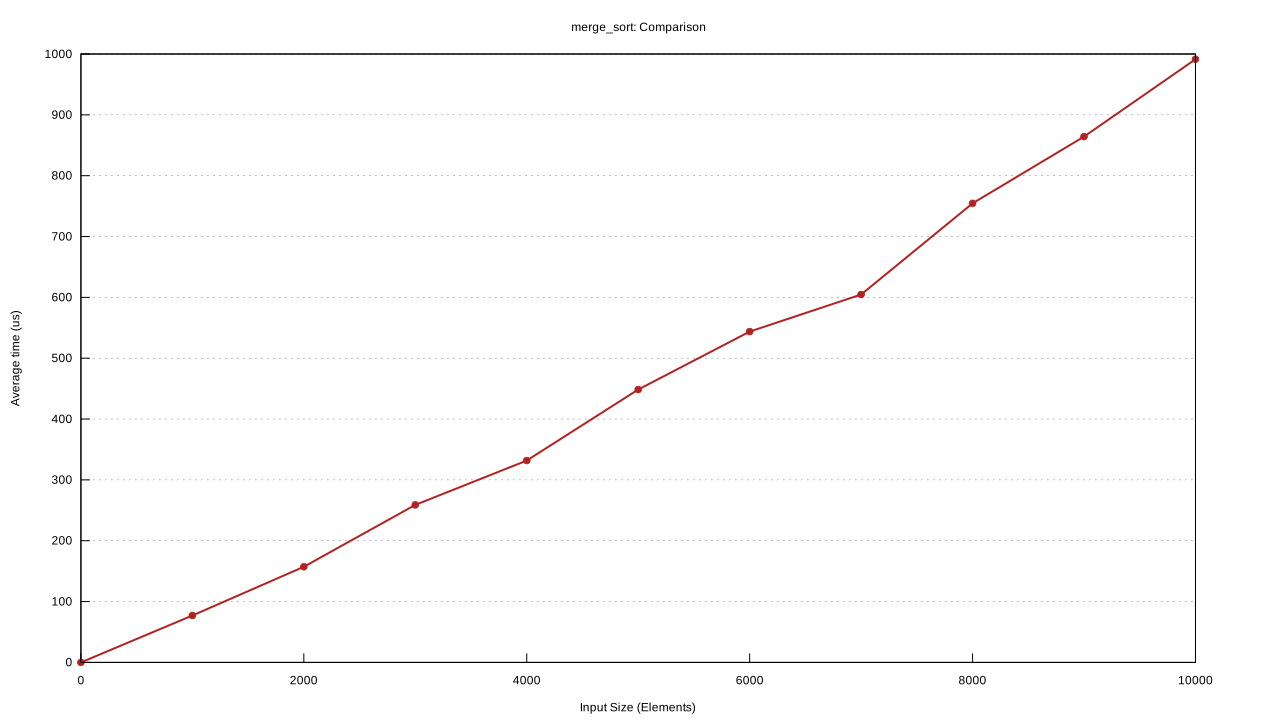
Our merge sort is 120 times faster than our bubble sort, and we can see from the shape of the two graphs that, for larger inputs, bubble sort will continue to get even slower! From these two graphs alone, it's clear which sorting algorithm we should use.
Profiling our Criterion Benchmark
What if we wanted to understand where our merge sort is spending its time? That's where the profiler comes in.
Criterion only runs the profiler if you pass the --profile-time
argument. When you use --profile-time, it also doesn't generate its
own report, so that your profiling results are more focused on the
code you're profiling, and not on Criterion.
cargo bench --bench bench_sort -- --profile-time 60 merge_sort/10000
This will create a flame graph image file in
target/criterion/<benchmark name>/profile/flamegraph.svg.
A web browser is a good option for looking at flame graph SVG files, since they include some JavaScript for zooming in and out. Right click on the image below and "open image in new tab" to try it out.
firefox target/criterion/merge_sort/10000/profile/flamegraph.svg
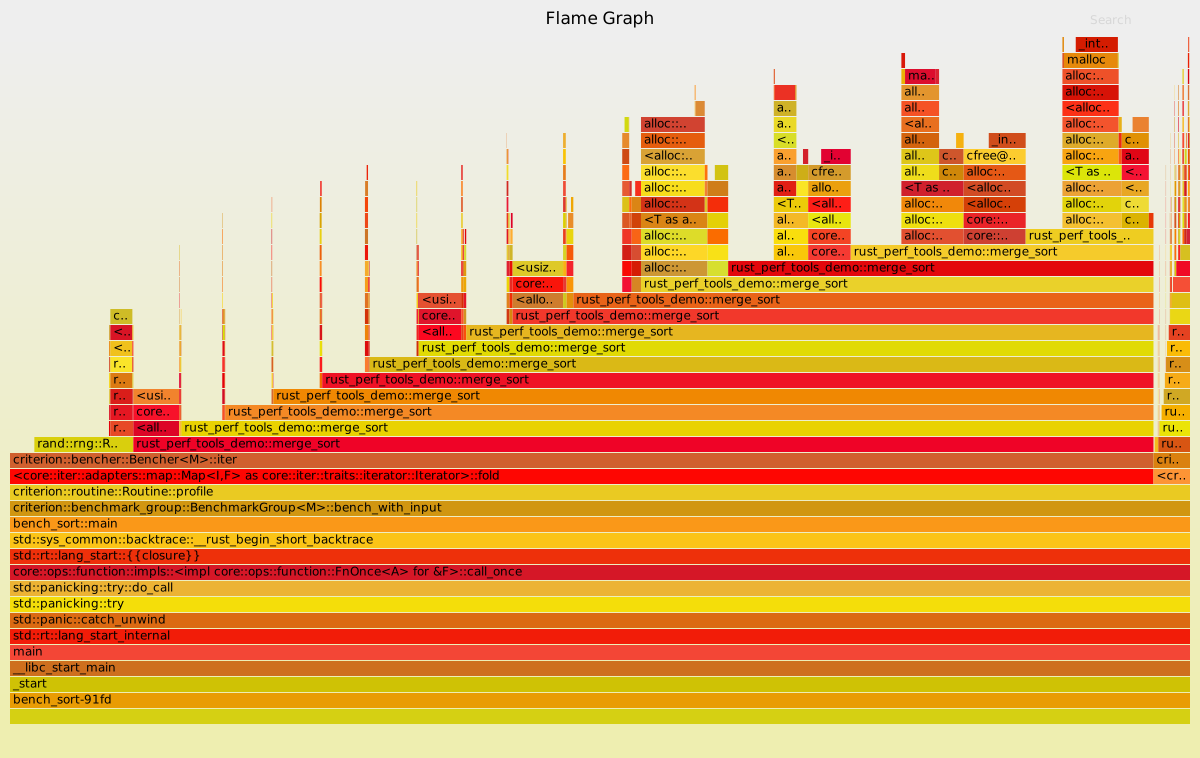
If you look at this flame graph, you can see that merge sort spends
most of its time calling merge sort! If we take a look at our code,
this makes sense since merge sort is built on independently sorting
two halves of our slice, then merging the two sorted
halves. Interestingly, we can also see that as we get to the merge
sorts with smaller inputs (higher up in the flame graph), it spends a
larger proportion of its time creating copies of its two halves with
to_vec. It might improve our merge sort if we used merge sort for
large inputs, but switched to a sorting algorithm that doesn't need to
copy the array for small inputs.
Profiling Memory with Heaptrack
Unfortunately Criterion doesn't have support for memory profiling built in yet. You can run Heaptrack with your Criterion benchmarks, but your results will be polluted with Criterion doing things. This isn't a problem if your program uses several megabytes of memory, but in this example we don't.
We can write our own lean binaries that just start up, do the thing we want to profile, and end. These could be in their own crate, but in this case I've put them in the examples folder.
This one is examples/bubble_sort.rs.
use rand::prelude::*;
use rust_perf_tools_demo::bubble_sort;

fn main() {
    let length = 10000;
    let mut input: Vec<u32> = (0..length).collect();
    let mut rng = thread_rng();

    input.shuffle(&mut rng);
    bubble_sort(&mut input);
}
This one is examples/merge_sort.rs.
use rand::prelude::*;
use rust_perf_tools_demo::merge_sort;

fn main() {
    let length = 10000;
    let mut input: Vec<u32> = (0..length).collect();
    let mut rng = thread_rng();

    input.shuffle(&mut rng);
    merge_sort(&mut input);
}
There are two steps to run these binaries with Heaptrack: First you
build it and then you run it. Make sure you do a release build, and
that you add the --examples flag if you're working with examples.
cargo build --release --examples
heaptrack target/release/examples/bubble_sort
heaptrack target/release/examples/merge_sort
After you run Heaptrack, it will end with a line that looks like this:
Heaptrack finished! Now run the following to investigate the data:

  heaptrack --analyze "some/path/to/heaptracks/data"
As the command says, copy the line that starts with heaptrack
--analyze to see the report.
Heaptrack unfortunately does not let me export its flame graphs as images, so it's difficult to get something readable and usable in this article, but these are the things I learned from looking at the output:
Our bubble sort program has a peak heap memory consumption of 113.2KB.
Our merge sort program has a peak heap memory consumption of 193.2KB.
From looking at the peak heap memory flame graph, we can confirm that the difference comes from our calls to
to_vecthat copy our data in our merge sort program.
So interestingly enough, even though our merge sort algorithm is significantly faster, if we needed to optimize for memory usage then bubble sort might be a better option.
A Side End Note on Sorting Algorithms
If you actually have a big slice of data that you want to sort, the
Rust standard library has two built in options: sort and
sort_unstable. They are both better than my naively written sorting
algorithms. If you actually want to fit into less memory, don't use
your own bubble sort, use the standard library's sort_unstable.